


Xcelsius
Xcelsius 2008 Fix Pack 3.5 now available

SAP released its 5th Fix Pack update for Xcelsius 2008 Service Pack 3 this week. Only three minor problems are resolved this time and my embedded swf-files issue isn’t even one of them.
Anyway, you can find the download at this page. This Fix Pack can be applied to Xcelsius 2008 SP3 or FP3.1, FP3.2, FP3.3 or FP3.4. Not sure which version you are running now? Have a look at this post.
Get the Release Notes here (PDF) and all Fixed Issues are listed in this document (PDF). I also listed them below:
1. Leading blank spaces are truncated.
This issue is resolved. Leading blank spaces are no longer truncated.
2. If the scroll bar is enabled for a spreadsheet table, the table disappears when the dashboard is refreshed.
This issue is resolved.
3. When a tooltip is displayed, the background colors change to the default colors.
This issue is resolved.
SAP BO Dashboards + Salesforce.com = DashConn

For the upcoming SAP BusinessObjects Dashboards Cookbook I had the pleasure to try some of the coolest add-ons for SAP BusinessObjects Dashboards (fka Xcelsius). One of them was the DashConn add-on by IdeaCrop. This add-on enables us to connect dashboards to real-time data from the popular CRM-cloud solution Salesforce.com. Let’s have a look at the features of this add-on.
Component
After installing the add-on a new component is added: Salesforce.com DataViewer. This component is used to establish the connection with Salesforce.com and to display the data from Salesforce.com. It actually works as an interactive grid in which you can set filters, aggregate data and drill-down/up in the report data.

Reports
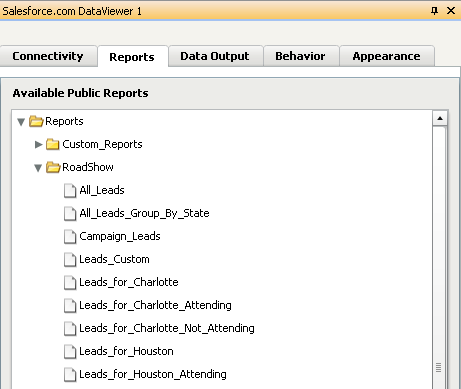
In the properties pane we can – after logging in with our Salesforce.com credentials – select the Salesforce.com report we want to use. So in fact the only thing you need to get Salesforce.com data into your dashboard is a proper Salesforce.com report that provides all the data you want to use. There is no need to set up XML-data connections or other solutions that will take a lot of time to build. Just select a report from the list.
Data Output
An interesting feature is the option to bind data to the spreadsheet. With this we can use the data from the Salesforce.com reports in other Dashboard Design components like charts and gauges. Not only the total result set can be bound to the spreadsheet, but also the selected rows can be bound separately! This enables us to make really interactive dashboards.

BI4 product names for Xcelsius
Last year I wrote about the new product name for Xcelsius: SAP Crystal Dashboard Design. Almost 10 months later everybody still uses Xcelsius and to make life even more difficult SAP has made some more ‘official’ adjustments to it.
The book I am working on now has its third different cover name since we started last summer! We decided to use SAP BusinessObjects Dashboards as the product name. We are referencing to the tool as Dashboard Design since that is the name that is displayed when you run it and SAP also uses it in the official guide. I think the Twitter hashtag now should be #SBOD.
SAP released a FAQ-document which provides the new names for all the products in the BI4 portfolio. I copied the part on SAP BusinessObjects Dashboards (fka Xcelsius) below.
In an effort to bring clarity around the BI solutions from SAP and use names that reflect the capabilities of our solutions, we have made several name changes in the SAP BusinessObjects Business Intelligence 4.0 release. These new names will make it easier for everyone to identify the BI solutions they are looking for and better understand their capabilities.
Q: Has Xcelsius Enterprise been renamed?
A: Yes. SAP BusinessObjects Xcelsius Enterprise and Xcelsius Enterprise Interactive Viewing have been renamed:
| Former Name | New Name |
| SAP BusinessObjects Xcelsius Enterprise | SAP BusinessObjects Dashboards |
| SAP BusinessObjects Xcelsius Enterprise Interactive Viewing | SAP BusinessObjects Dashboards Interactive Viewing |
Q: What is SAP BusinessObjects Dashboards?
A: SAP BusinessObjects Dashboards (Xcelsius Enterprise) is a desktop dashboard and visualization solution that is a core part of SAP BusinessObjects BI 4.0. Once a user creates a dashboard model, it can be deployed in Flash format to Web portals, SAP environments, the SAP BusinessObjects BI platform, and desktop applications such as PowerPoint, Word or PDF.
Q: What are the related Dashboard offerings out there?
A: For our customers that buy through our partners, distributors and through our Web store SAP offers:
- SAP Crystal Dashboard Design, personal edition
- SAP Crystal Dashboard Design, departmental edition
- SAP Crystal Dashboard viewing option
- SAP Crystal Presentation Design
SAP HTG: Calling BEx Web Applications from SAP BusinessObjects Dashboards (Xcelsius)

It has been a while since my last post here. I’ve been busy at work and of course I am spending a lot of my time on writing the SAP BusinessObjects Dashboard Design (Xcelsius) cookbook The writing process is nearing its end which means we are finishing the final ‘recipes’ and reviewing and discussing the chapters that already completed with the publishing team and the technical reviewers. Last month I also reviewed a number of add-ons for Dashboard Design which was pretty cool. I will blog about it later when I got some more time.
Meanwhile I found this How-To Guide by SAP somewhere on SDN, which shows you how to open BEx Web Applications from a SAP BusinessObjects Dashboards dashboard (uh, this sounds weird). It shows you how to use Flash Variables, the URL button component and some MS Excel formula magic to make this work.
The second part of the HTG explains how to call a dashboard from a BEx Web Template or a BEx Query with the good-old Report-to-Report interface (RRI).
You can find this HTG here. Have fun!
Posted in: SAP BusinessObjects Dashboards, XcelsiusXcelsius 2011: Direct query binding
Somewhere in the first half of 2011 the next version of SAP Crystal Dashboard Design (Xcelsius) will be released as part of the new SAP BusinessObjects 4.0 (#BI4) portfolio. SAP hasn’t given us a release date yet, but they did put a few demo’s and tutorials online that already give an impression of what is coming.
The most important new feature to Xcelsius seems to be an additional way to connect a dashboard to a Universe. A new Query Browser menu is introduced which enables the creation of queries on Universes without leaving Xcelsius or having to use tools like Query as a Web Service (QaaWS).


In these queries you can determine which fields should be loaded into the dashboard and define some filters, prompts and sorting settings. To use these prompts to filter data during dashboard runtime the new Query Prompt Selector component can be used.

Binding the results of such a query to the spreadsheet works just like binding the current data connections. Additionally it will be possible to bind a component directly to a query, so without using the spreadsheet at all! This feature will certainly make development a lot easier and faster.


Finally I want to share a video that demonstrates these new possibilities. Also have a look at the tutorials SAP put on their community website which learned me the above, since I do not have access to the beta/ramp-up version yet. BTW if you can get me this, plz let me know. 😉
Posted in: SAP BusinessObjects Dashboards, Xcelsius


