


Salesforce.com
SAP BO Dashboards + Salesforce.com = DashConn

For the upcoming SAP BusinessObjects Dashboards Cookbook I had the pleasure to try some of the coolest add-ons for SAP BusinessObjects Dashboards (fka Xcelsius). One of them was the DashConn add-on by IdeaCrop. This add-on enables us to connect dashboards to real-time data from the popular CRM-cloud solution Salesforce.com. Let’s have a look at the features of this add-on.
Component
After installing the add-on a new component is added: Salesforce.com DataViewer. This component is used to establish the connection with Salesforce.com and to display the data from Salesforce.com. It actually works as an interactive grid in which you can set filters, aggregate data and drill-down/up in the report data.

Reports
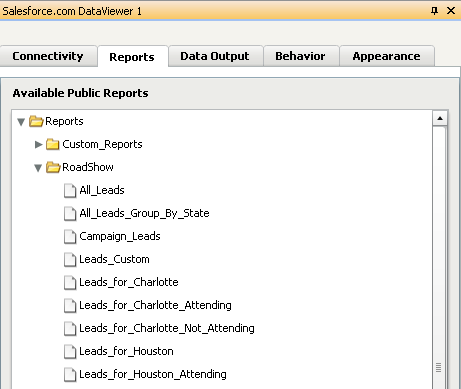
In the properties pane we can – after logging in with our Salesforce.com credentials – select the Salesforce.com report we want to use. So in fact the only thing you need to get Salesforce.com data into your dashboard is a proper Salesforce.com report that provides all the data you want to use. There is no need to set up XML-data connections or other solutions that will take a lot of time to build. Just select a report from the list.
Data Output
An interesting feature is the option to bind data to the spreadsheet. With this we can use the data from the Salesforce.com reports in other Dashboard Design components like charts and gauges. Not only the total result set can be bound to the spreadsheet, but also the selected rows can be bound separately! This enables us to make really interactive dashboards.


